EyeLet OutLet Wholesale Home Page
EyeLet OutLet Wholesale Home Page About EyeLet OutLet Wholesale Contact Information About EyeLet OutLet Wholesale
 
Home    About Us    Contact Us    Order Status    Login 
? View Items In Your Shopping Cart Shopping Cart is Empty 
Shop By Category
Animal Eyelets & Brads
Baby Brads
Brad Mates
Brads - Round
Brads - Safari , Animals
Button & Arrow Brads
Bugs & Critters
Clearance
Clothes Line Brads
Drinks - CLEARANCE
Flowers & Fruit
Geometric Brads
Heart & Star Brads
Holiday Brads
Holiday Eyelets
Home Town Hero Brads
Jewel Brads
Letter Charms
Loopy Brads
Military Eyelets
Miscellaneous Brads
Miscellaneous Eyelets
Mixed Bag Eyelets
Ocean Brads
Outdoor Eyelets
Quicklet Eyelets
Sign Brads
Standard Shape Eyelets
Sports Eyelets & Brads
Tags, Charms -Clearance Priced
Tools, Washers,Bags
Coming Soon
Eyelet Setting Directions
Vacation Brads

Links
  Return Policy
  Idea Gallery
  About Us


ECommerce Shopping Cart Software and Storefront Help

Shopping cart software help is meant to guide you through the buying processes on our web store. Please follow the below given steps to enjoy the experience of shopping on our web store.
 
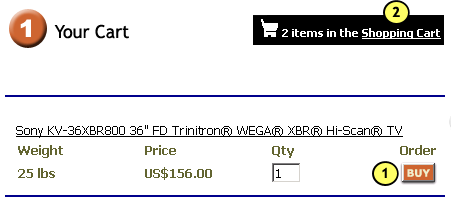
1. Click the “Buy” button to add a product to your shopping cart.
2. Click the “Shopping Cart” link on top right corner to view your Order Details in the cart.


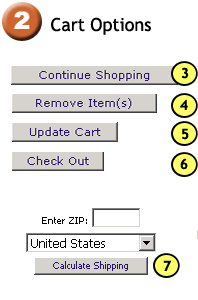
3. Click to Continue Shopping
4. Select a particular item(s) and click “Remove Item(s)” to remove the product from your order list.
5. You can update the order quantity, remove items or add items and then click “Update Cart” to view your order details.
6. Click the “Check Out” button when done with adding products to your shopping cart.
7. Enter the Zip of your state and Calculate the Shipping Rates applicable on your order.
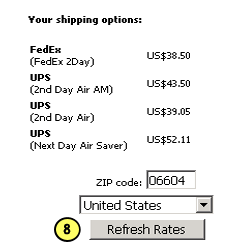
8. You can also change the Zip and Refresh the Shipping Rates if the order is not to be delivered in your state


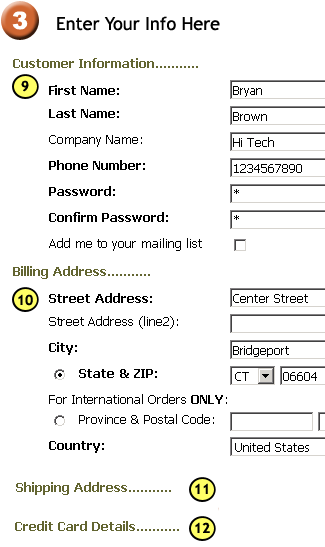
9. Enter your Personal Information here.
10. Enter your Billing Information here with the exact Address.
11. Enter the Address where the Order has to be Shipped.
12. Enter you Credit Card Details for verification


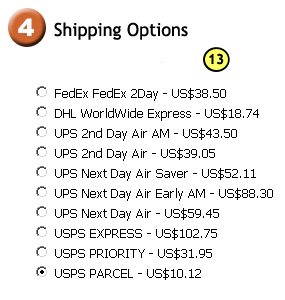
13. Choose from the various available Shipping Options.


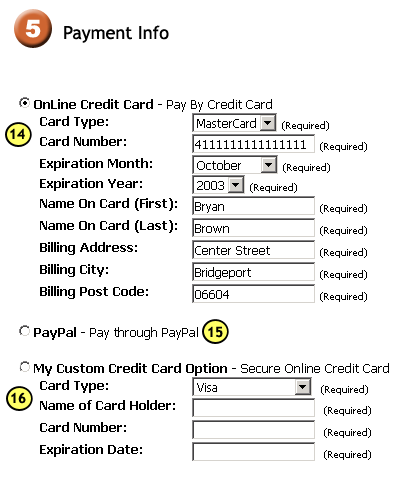
14. Here you need to provide your personal information and necessary credit card details so that the payment gateway that the store is integrated with, can verify your details. On confirmation of your information details, you can now click “Next Step” to proceed and place your order.

15. If you select to “pay through Paypal”, on clicking the “Next Step” button, you will be directed to the “Paypal” site for verification of your details. Once verified, you have the option to come back to the store and “Place Order” after confirming your order details in the preview of your order.

16. If provided with a Custom Credit Card Option, enter the required information and proceed to the “Next Step” to “Place Order”.


Confirm your Order Details in the Next Step to place your Order


Thanks for Shopping
Proceed to Checkout


This Online Store is powered by GoECart Shopping Cart Solution